For years, your Google Business Profile had one job: help your business show up in the map pack when someone nearby searched for what you do. Keep your hours accurate, collect a few reviews, add some photos, and the profile did its work. That job hasn’t gone away, but the profile now has a second one that most small business owners haven’t caught up to yet.
Google’s AI Overviews, Gemini, and AI Mode now pull directly from your Google Business Profile when they generate an answer to a local search. A profile that’s optimized purely for map pack placement isn’t automatically optimized for the way an AI model reads and interprets that same data. This checklist walks through exactly which fields matter most and how to get each one right.
Why Your Google Business Profile Now Powers AI Answers
When someone searches a local query that triggers an AI Overview, Google isn’t just crawling websites. It’s drawing on its entire local data infrastructure, and your Google Business Profile sits near the top of that stack. Google’s own documentation on how it sources and uses business information confirms that profiles are compiled from a mix of what you provide, what customers contribute, and Google’s own interactions with your business, then surfaced across Search, Maps, and connected AI experiences.
Business category, service descriptions, review content, Q&A responses, photos, and attributes all contribute to how an AI system describes your business and what it recommends you for. A competitor with a thin, outdated profile is less likely to get cited in an AI generated answer, even if their website is otherwise solid, simply because there’s less verified material for the model to work with.
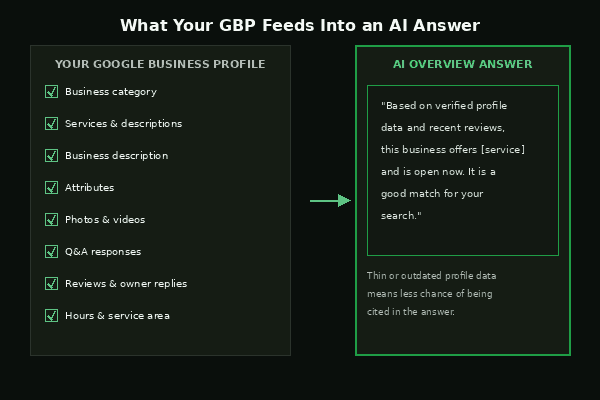
The Local AI Search Checklist for Your Google Business Profile
Go through each of these on your own profile. None of them require a developer or a big budget, just time and specificity.
Get your business category right
Your primary category is one of the strongest signals both traditional local search and AI systems use to understand what you do. Choose the most specific option available, not a broad umbrella term, and add secondary categories only for genuine departments or services you offer. Google’s guide on managing your business category covers exactly how primary and additional categories should be structured.
Fill out every service with a real description
If your business category supports the services feature, don’t just list a service name and stop there. Add a short, specific description for each one. “We repair furnace ignitors, thermostats, and blower motors” gives an AI model far more to work with than “HVAC repair.” Google’s services management guide explains how to add both suggested and custom services.
Write a complete, specific business description
Your business description has room for up to 750 characters. Use it to say plainly what you offer, who you serve, what makes you different, and how long you’ve been operating. Avoid vague marketing language. An AI system pulling from this field needs concrete, factual statements, not slogans.
Add photos that show what you actually do
Exterior shots help customers recognize your location, but interior photos, team photos, and photos of finished work or products give both customers and AI systems more context about what a visit or purchase actually looks like. Update these regularly rather than leaving the same handful of images from years ago.
Answer every question in your Q&A section
The Q&A section is easy to forget about, but it’s public, it’s specific, and it’s exactly the kind of direct question and answer content that AI systems are built to extract. Monitor it regularly and post your own common questions with clear answers rather than waiting for customers to ask first.
Keep attributes and hours accurate
Attributes like accessibility features, payment options, or service amenities add factual detail that helps an AI system match your business to a specific customer need. Incorrect hours are one of the fastest ways to lose trust with both customers and the systems recommending you, so review them every time your schedule changes, including holidays.
Treat reviews as an ongoing job, not a one time push
Review volume, recency, and content are treated as trust signals by both traditional local search and AI systems. A steady, ongoing stream of recent reviews, with owner responses, tells an AI model your business is active right now. A batch of reviews from three years ago with nothing since does the opposite.
What Happens If Your Profile Is Thin or Outdated
Nothing dramatic happens overnight. Your profile still shows up, your map pin still appears, and customers can still find your phone number. What changes quietly is your odds of being the business an AI system actually names when someone asks a comparison question. If Google’s Business Profile guidance on editing your profile is any indication, the fields worth updating regularly (services, description, attributes, photos, Q&A) are the same ones doing double duty as AI training material for your local presence.
The businesses that keep showing up in AI generated local answers tend to share one habit: they treat their Google Business Profile as a living document, not something they set up once and forgot about.
Frequently Asked Questions
Does a complete Google Business Profile guarantee I’ll show up in AI Overviews?
No single field guarantees inclusion. AI Overviews weigh many signals together, including your website, reviews, and directory consistency, alongside your Google Business Profile. A complete, specific, current profile simply gives you a much better chance of being one of the sources cited.
How often should I update my Google Business Profile?
Treat it like any other active marketing channel. Check hours and attributes whenever they change, add photos monthly if you can, respond to reviews as they come in, and revisit your services and description at least once a quarter to make sure they still reflect what you actually offer.
Does this matter if I don’t have a physical storefront?
Yes. Service area businesses can still claim and fully optimize a Google Business Profile without showing a public address. The same fields, category, services, description, reviews, and Q&A, still feed local search and AI answers the same way.
Is this a one time setup or an ongoing task?
Ongoing. AI systems tend to favor businesses with recent activity, meaning recent reviews, recent photos, and current information. A profile that hasn’t been touched in over a year sends a weaker signal than one updated regularly, even if the original setup was thorough.
Turning Your Profile Into an AI Visibility Asset
Your Google Business Profile used to be a map pack listing. Now it’s also raw material for every AI system answering local questions on your behalf, whether the customer ever visits your website or not. Working through this checklist once is a good start, but the businesses winning this shift are the ones who keep coming back to it.
If you’d like a second set of eyes on your profile alongside the rest of your local presence, our SEO services and GEO services are built around exactly this shift, and we’re happy to review where your gaps are.